Jacobus Mp3 Player
Jacobus Média Player
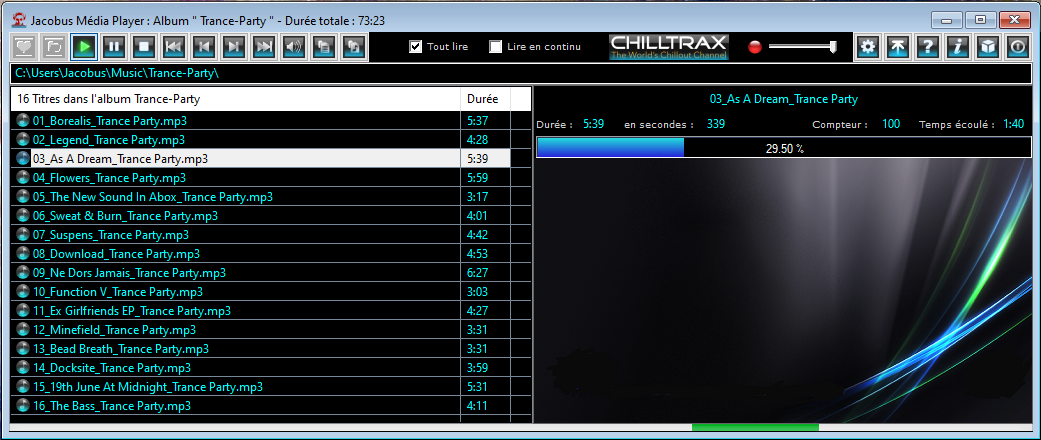
An audio player for MP3 and WMA files.
Listen to your music using your PC.
Easy to use, it allows you to easily create playlists for hours of listening.
Last updated: version 2.23 of June 13, 2024
User settings

You can modify certain Jacobus Media Player settings by selecting or deselecting the following options:
- Play All: All tracks in the list will be played consecutively (default option).
- Play Continuously: When playback reaches the last track, it resumes directly from the first track and repeats.
- Current Album on Next Start: Save the album you are currently listening to so you can resume playing it the next time you start Jacobus Media Player without having to search for it. This can be a playlist, which will be automatically reloaded.
- Save Favorite Album: (first button in the top left corner) This album will be loaded each time you start the player, unless you have chosen to save the current album. This favorite album is still saved and can be changed at any time.
- Enable Slideshow: Display a slideshow of images while music tracks are playing. A new image will appear each time the track changes.
- Action on the Chilltrax button, 3 possible choices:
- launch of the listening module (default);
- connection to the original site in the USA;
- connection to a French site which allows listening.
Playlist creation
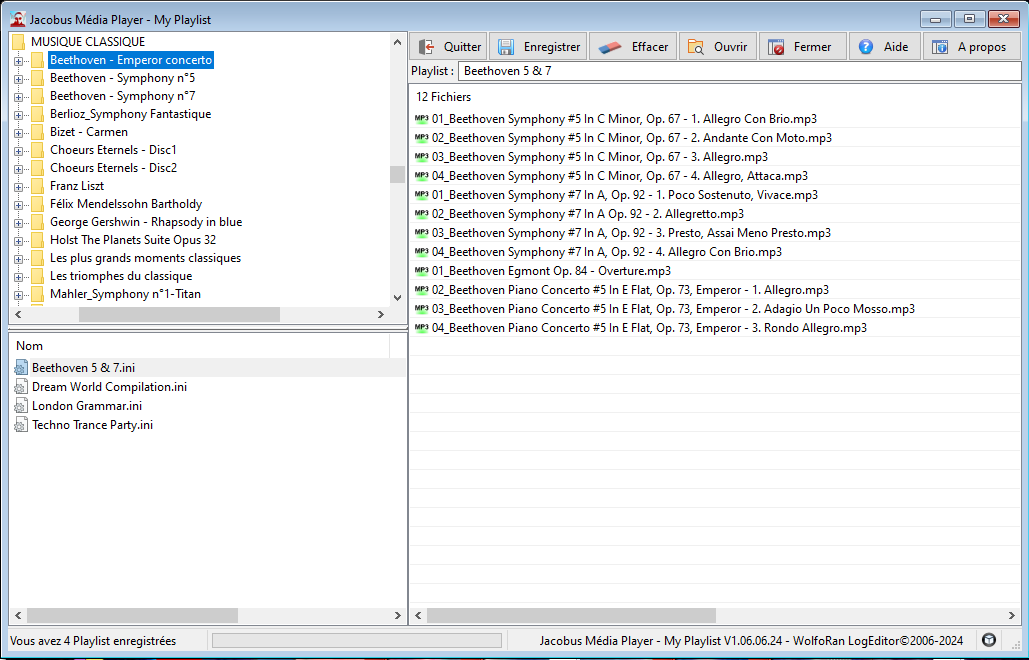
Open the playlist manager and create your perfect album. The file explorer opens directly to the "Music" folder, and you can then add as many music tracks to your list as you like. You can do this file by file, or by entire folders, one folder at a time.
Diaporama
The slideshow images can be modified to suit your preferences. Simply go to the "Background images" folder in the application and replace them with your chosen images, or add new ones. They must be in BMP, JPG, or PNG format.
While rectangular images are best suited for this purpose, regardless of their size, they will be automatically resized to fit the JMP window.
Chilltrax

A small application that lets you listen directly to the web radio station "Chilltrax". The connection is automatic, and to stop it, simply close the window.
File description
Fichier : jacobusmediaplayer-v2-23-x86.exe
Date : 13 juin 2024
Langage : Français
Version : 1.23.06.24
Système d'exploitation : Windows 7, 8, 8.1, 10 et 11
Structure : 32 ou 64 bits
Résolution écran : 1024 x 768 minimum
Mémoire vive : 512 MB de RAM minimum